Shape It Freely.
Make It Exact.
Sculpt is Avlory's 3D and 2D studio. Sculpt clay, model exact CAD solids, paint, rig and animate, simulate and render with a path tracer, all in one .sculpt file. Every demo below runs in your browser; the screens are from Sculpt itself, and every number says how it was measured.
- Windows
- Linux
- macOS
- iOS
- Android
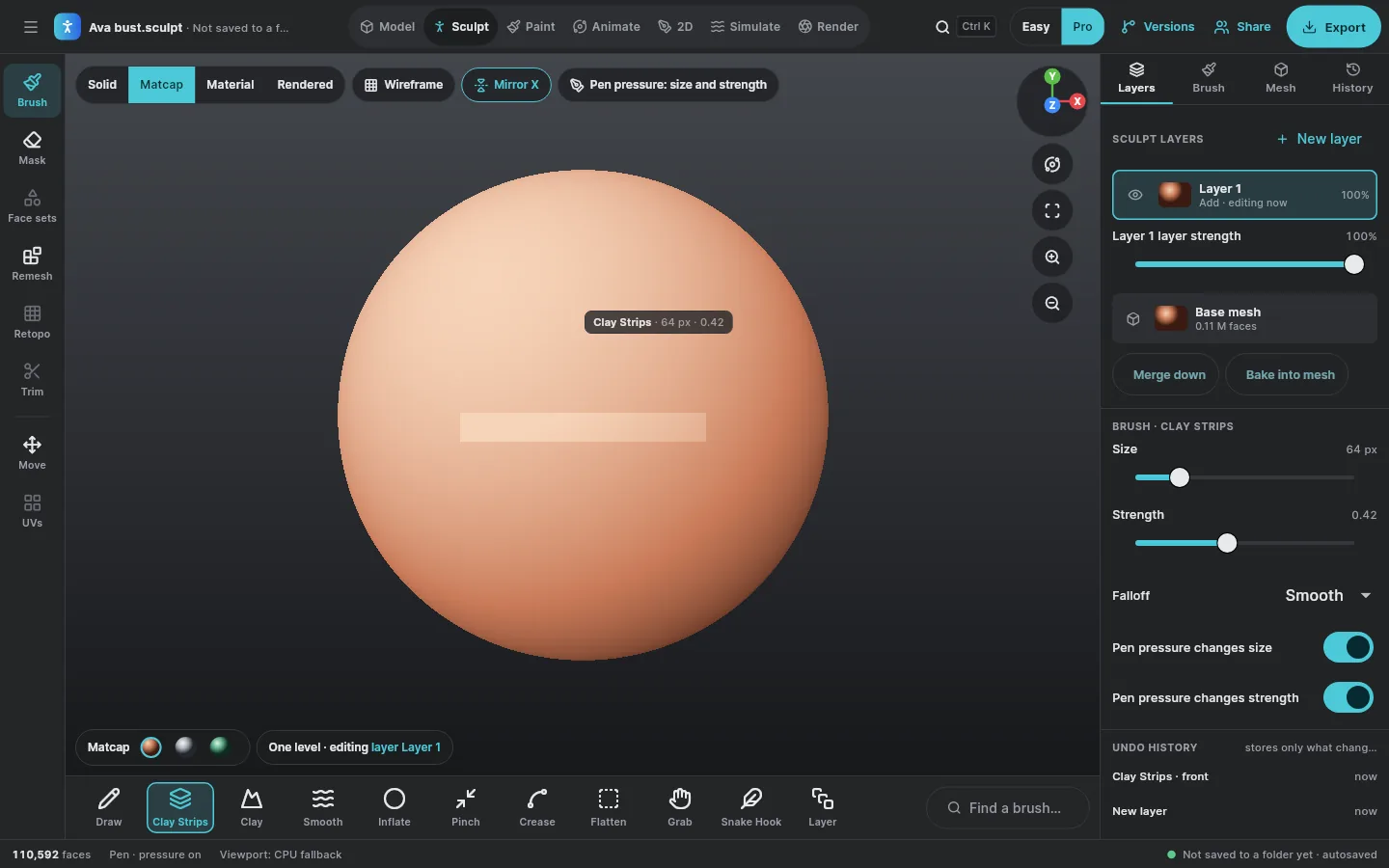
Clay that keeps up. Undo that does too.
Twelve brushes, sculpt layers you can fade, Mirror X, and pen pressure on size and strength. Undo keeps only the chunks a stroke touched, so it stays quick on dense meshes. Drag on the sphere to try it: hold Shift to smooth and Ctrl to carve, as in Sculpt.
Keyboard: arrow keys move the brush, Enter presses in, Shift+Enter smooths. A 2D canvas shading a height field, not Sculpt's engine.
- No strokes yet.
Undo here also keeps only the tiles a stroke changed.
Measured 31 October 2026 on a cloud VM with 4 processor threads and no graphics card, so this is the processor's share only: the dabs of one pen event, then normals and bounds. The target is 60 fps sculpting and undo under 100 ms at 10 million faces on a desktop with a GPU; the GPU's share isn't measured yet. cargo run --release -p avlory-sculpt-sculpt --example bench
Exact solids. Failures that explain.
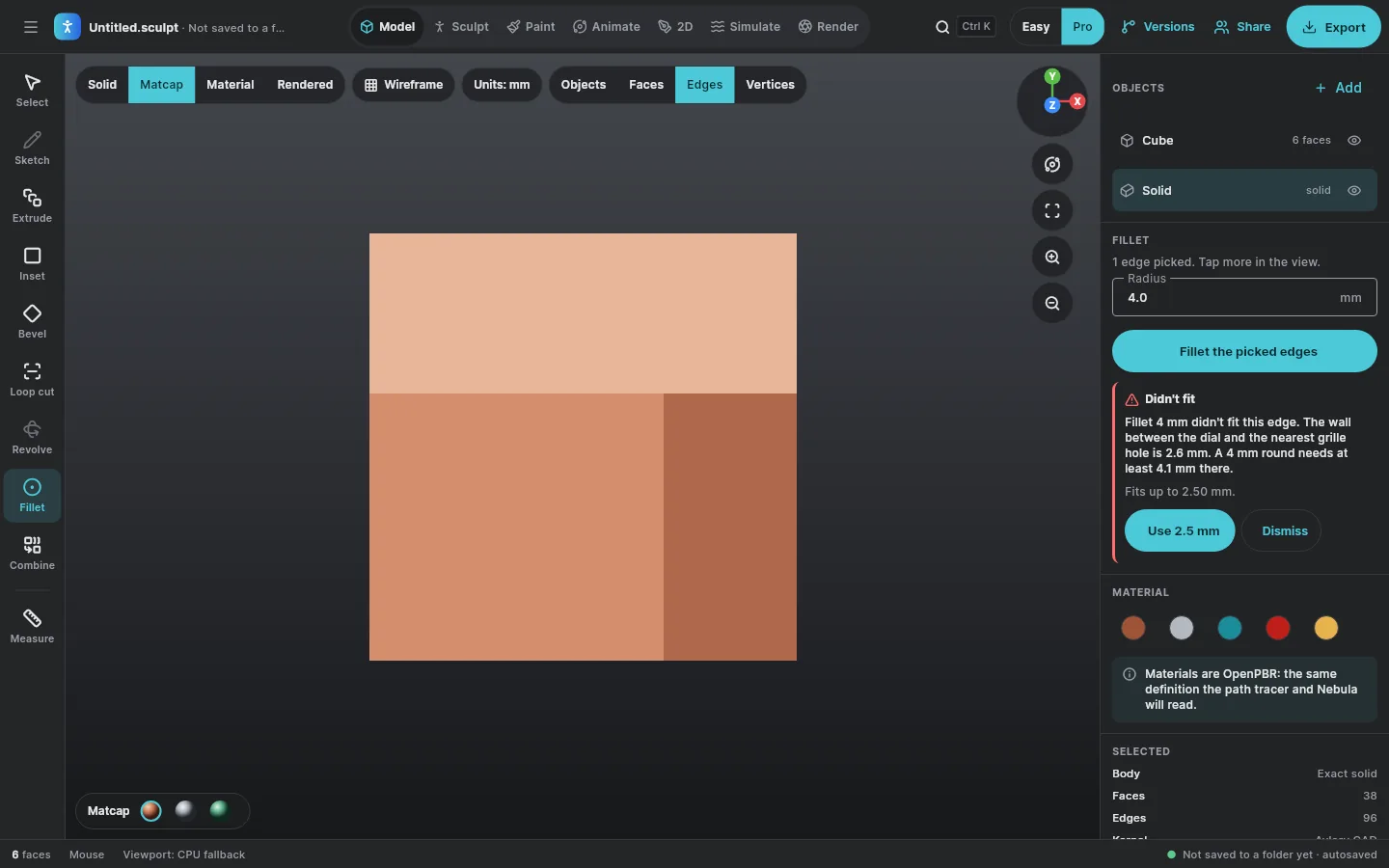
Meshes and exact NURBS solids share one scene, from Avlory's own CAD engine, in real units. When an operation can't work, Sculpt says where, why, and what would fit. Try a 4 mm fillet on the edge between a speaker's dial and its nearest grille hole.
1 edge picked: the dial's rim.
Didn't fit
Mesh tools
First buildExtrude, inset, bevel, loop cut, Catmull–Clark subdivide, merge, mirror, booleans and UV unwrap. Every refusal names the place and the reason.
Real units
First buildMillimetres, centimetres, metres or inches. A 4 mm fillet is 4 mm in any scene, and so is the print check’s “walls at least 2 mm”.
Booleans under stress
First buildIn a 1,000-pair run each of box and cylinder, and box and box, no pair failed after the October fixes.
STEP in and out
First buildAssemblies, colours, layers and units come across; anything that can't is listed in the import report.
Exact geometry we wrote, so every failure can explain itself.
The solids in Sculpt come from Avlory CAD: a NURBS and B-rep kernel in Rust, written from scratch, with no runtime dependencies and nothing from OpenCASCADE, a paid kernel or any LGPL or GPL code. It's its own library, so Nebula uses the same exact solids, measuring and STEP support rather than a copy.
| Sculpt needed | truck (read, not adopted) | Avlory CAD |
|---|---|---|
| Clean dependencies | Apache-2.0, but pulls in 135 crates, one flagged unmaintained, so the workspace's licence and advisory check fails without an exception. Last release September 2024. | No dependencies; the check passes with no exceptions |
| Exact booleans | Intersections are polylines from triangles, so a drilled hole comes back with a faceted rim. A failure gives no reason. | A hole's rim is an exact circle; curves that have to be traced are fitted within 0.0001 mm |
| Fillets, chamfers, shell | None | All three, each checked for fit before anything is built |
| Failures that explain | Nothing structured | What failed, where, the measured size, what fits, and a suggestion |
| STEP with a report | No colours, layers, assemblies or report | Our own reader and writer, keeping all of them, with an import report |
We read truck's code to compare approaches and copied none of it. Its NURBS maths was the one piece worth adopting, and that part is textbook (Piegl and Tiller), so we wrote it and tested it ourselves. From the engine's design notes, checked against truck's crates at versions 0.3 to 0.6 on 31 October 2026.
Curves and surfaces
First buildNURBS, plus exact lines, circles, ellipses, parabolas and hyperbolas, and exact planes, cylinders, cones, spheres and tori.
Features
First buildExtrude with draft, revolve, sweep, push and pull, shell, booleans, fillets and chamfers along tangent chains.
Sketches
First buildLines, arcs, circles and splines with eleven kinds of constraint. The solver says how much is still free, and which constraints clash.
History you can edit
First build“How this part was made”, step by step. Change a size and it rebuilds; a step that no longer fits says so and waits.
Measure
First buildVolume, area and centre from the true surfaces (volumes exact to about one part in a billion), and a print check for thin walls.
STEP AP214 and AP242
First buildNames, assemblies, units, colours, layers and PMI come in, with a report on every item. PMI is kept as data, not shown yet.
Why it says “Use 2.5 mm”
Before a fillet is built, every check runs: the strip left between the round and the next edge, two blends on one face, the ends of the chain. If one fails, the engine searches for the largest size that passes and rounds it to a tidy step. A fillet must leave at least 0.1 mm of flat, so a 2.6 mm wall fits up to 2.5 mm.
- Same point
- closer than 0.000001 mm
- Largest error it adds
- 0.0001 mm, on traced curves
- Narrowest strip left
- 0.1 mm
- Size steps
- 0.05 mm, or 0.01 mm below 0.5 mm
What's honestly left
- Corners where several filleted edges meet, variable-radius fillets, and fillets between curved faces whose normals change (spheres, tori, free-form sides) are refused with “isn't supported yet”.
- The fit checks don't yet catch a fillet running into a third face further away.
- IGES isn't done. STEP surface bodies, offset surfaces and cross-drilled seamed cylinders are reported as not supported.
- Two equal cylinders overlapping aren't merged into one face yet, and very small intersection loops can be missed.
Tests: cargo test -p avlory-sculpt-cad, run 3 November 2026 on the same 4-thread VM. Booleans: a one-off stress run with the property tests' generators, seeded per pair and not part of the suite, after the 31 October fixes: 1,000 box/cylinder and 1,000 box/box pairs, each result valid, its mesh closed and the volumes adding up, or (19 pairs) refused in words as touching only along an edge or a line; then 2,000 more of each. Recorded in the engine's design notes.
Paint in layers, inside the modeler.
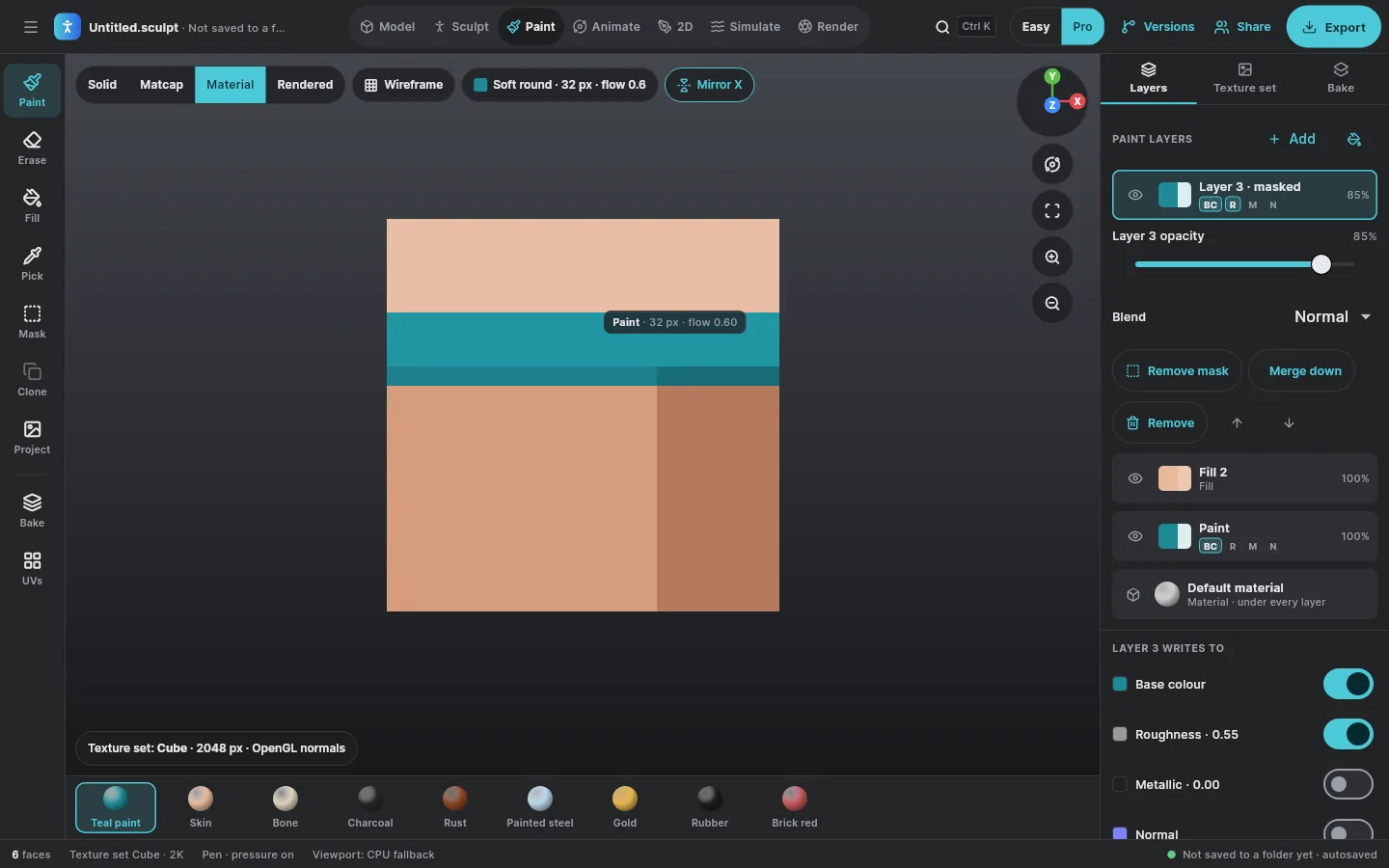
Texture sets from 1K to 8K, or vertex paint when a mesh has no UVs. Layers with masks and four blend modes, six channels, bakes for ambient occlusion, curvature and high-to-low normals, and maps exported for the engine you use. Paint on the layer below, then change how it blends.
Drag to paint on Layer 2. Hold Ctrl to erase.
- Layer 2 paint · base colour, roughness
- Layer 1 fill · base colour
- Material under every layer
Measured 1 November 2026 on the same 4-thread VM with no graphics card: 120 pen events along an arc over a 16,128-triangle sphere, painting base colour and roughness. Big brushes at 8K fall short of 60 fps on the processor; painting on the GPU is the next step there. cargo run --release -p avlory-sculpt-paint --example bench
Rigs that say what went wrong.
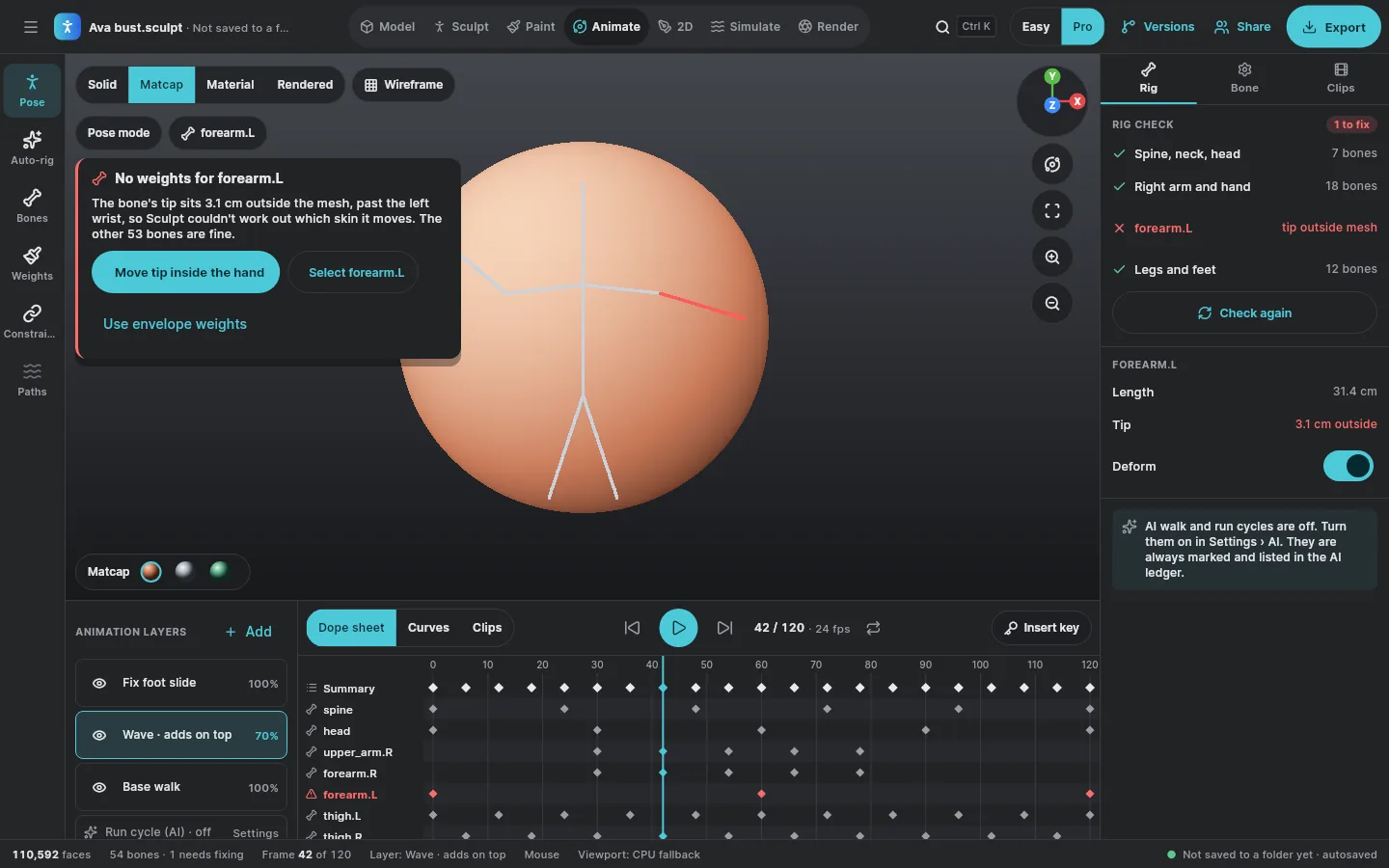
Auto-rig a figure, bind it, key it on animation layers, and work in the dope sheet or the curves. When binding fails, the Rig check names the bone, says why, and its fixes work. AI walk and run cycles are off unless you turn them on, and are always marked.
No weights for forearm.L
The bone's tip sits 3.1 cm outside the mesh, past the left wrist, so Sculpt couldn't work out which skin it moves. The other 53 bones are fine.
Measured 1 November 2026 on the same 4-thread VM with no graphics card, keyed over two seconds and played frame by frame as the viewport does. cargo run --release -p avlory-sculpt-ffi --example anim_bench
Lay out a scene in one step.
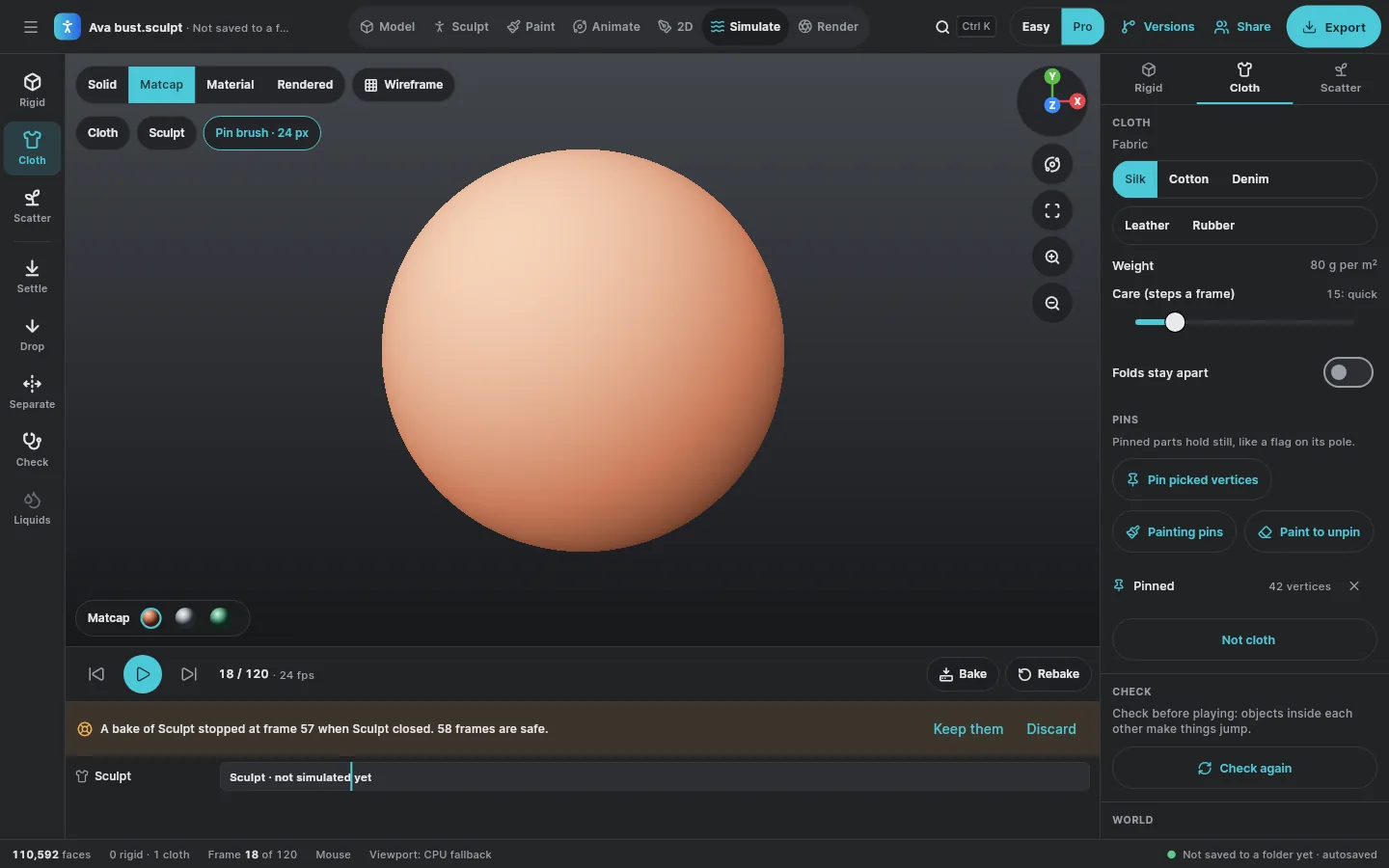
Settle lets objects fall and come to rest; Drop to floor moves each one straight down; Separate pushes them apart. Each is one undo step. Rigid bodies and cloth play on the shared timeline and bake into the file as they go, so a crash loses at most a frame.
Measured 1 November 2026 on the same 4-thread VM with no graphics card. Liquids, smoke and fire on the graphics card come later. cargo run --release -p avlory-sculpt-ffi --example sim_bench
A path tracer, honestly labelled.
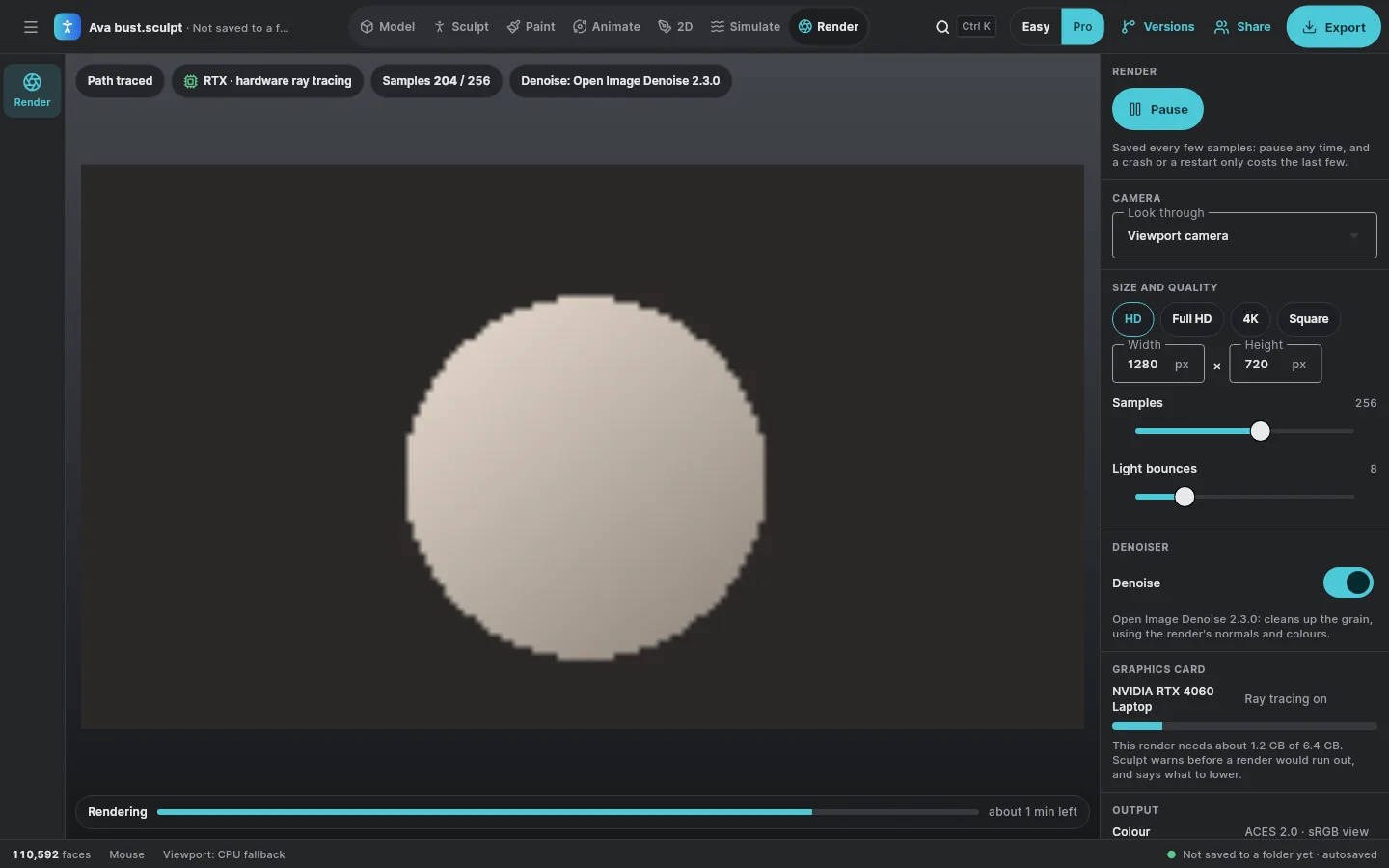
A real-time view plus a full path tracer. It uses RTX or other ray-tracing hardware when the graphics card has it, a compute path when it doesn't, and the processor as the reference, and it says which one is drawing. The picture fills in as you watch, pauses and resumes, and a crash or restart costs only the last few samples.
Running on your browser's processor: a few dozen lines, nothing like Sculpt's. It shows how a path-traced picture fills in.
0 / 64 samples
Not tested on a real graphics card yet
- Nothing has run on RTX or any real GPU. The ray-tracing path ran only on a software GPU (Mesa's lavapipe) on the build VM, where the image matched the processor's reference.
- DirectX 12 and Metal aren't tested, the browser build isn't wired up, and Open Image Denoise isn't installed on the build machine.
- The screen below comes from a screen test: its graphics card name and memory are test values, not a measurement.
Measured on the same 4-thread VM, using lavapipe (a software Vulkan GPU running on the same processor). These show relative cost on a processor, not GPU speed. cargo run --release --example measure
Opens the way it looked.
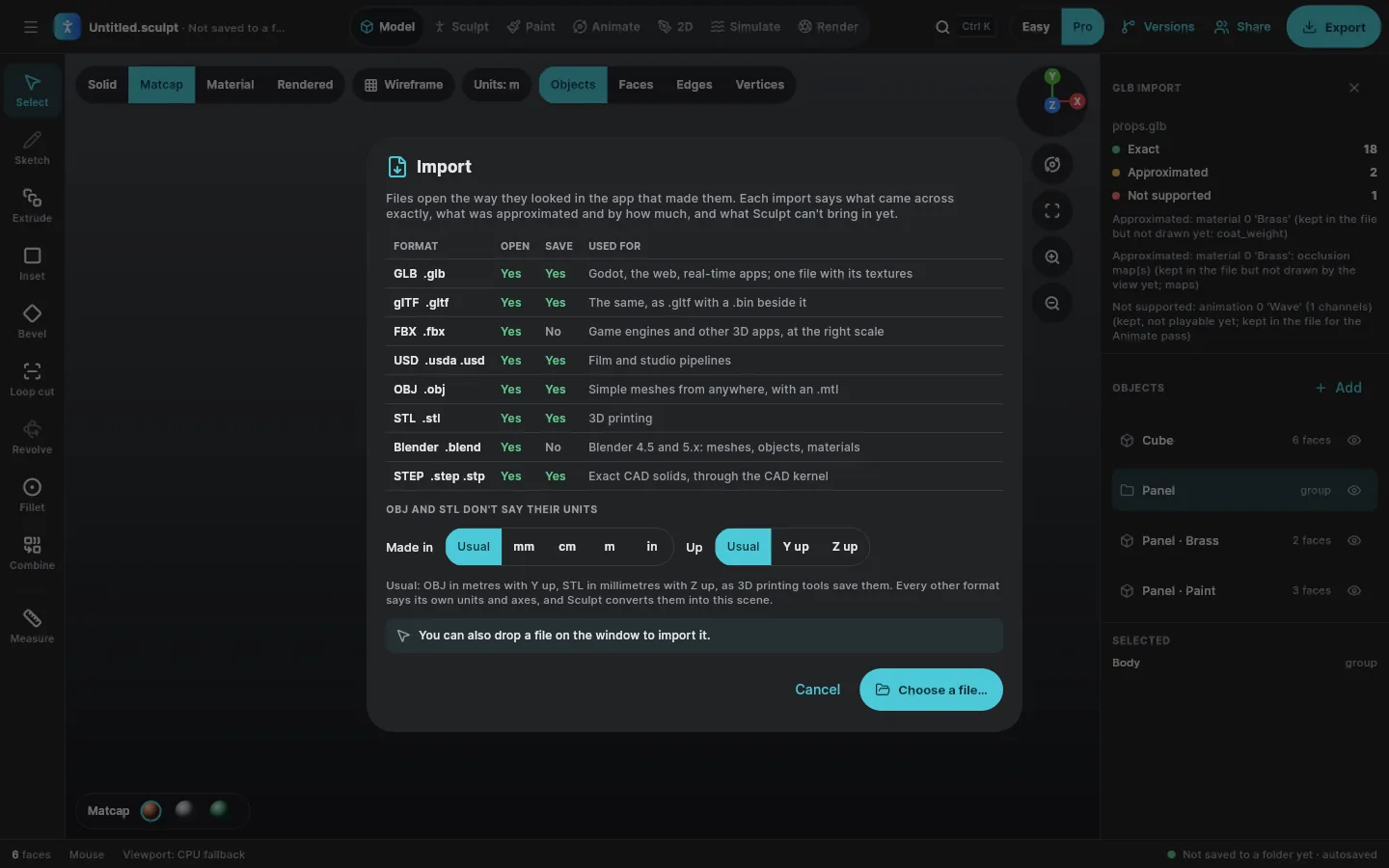
Every format has its own translator, and every translator reads into the same neutral scene. Units and axes are converted exactly and said out loud, so a centimetre FBX isn't 100 times too big and a Blender file doesn't land on its back. Anything that can't come across exactly is never changed silently: the import report marks every item exact, approximated (with by how much) or not supported. The same layer serves Nebula. Pick where a file came from, then open it with and without its translator.
- 1 · The fileAs its app saved itglTF, OBJ, STL, FBX, USD (.usda), .blend or STEP, in that app's units and axes
- 2 · Its translatorOne per formatReads the file as the app that made it means it; ufbx (MIT or Unlicense) for FBX, our own readers for the rest, and the CAD engine for STEP
- 3 · The neutral sceneOne model for every formatMetres, right-handed, +Y up: n-gons, hierarchy, OpenPBR materials, cameras, lights, skins and clips
- 4 · Sculpt, or NebulaOpens with a reportEvery item exact, approximated or not supported, and why
The files are the format tests' own reference files, written by hand the way Maya, Blender and CAD apps lay them out, and the report lines are what the translators print for them. “Numbers as they are” shows what a reader without the translator's conversion would get.
Reference files
BuiltEach translator is tested against a reference file in its format: positions, normals, UVs, materials and the report's lines are checked against what the file says.
Round trips
BuiltglTF, GLB, OBJ, STL, USDA and STEP are written and read back, and must come back the same: a texture lands the same way up from OBJ to glTF to USD.
Every axis system
BuiltConversions are exact and reversible, and keep faces pointing outwards when handedness changes.
Hostile files
BuiltDamaged and oversized files fail with a message, never a crash. Fuzzing found crashes inside the glTF library; those inputs are now turned away before it sees them.
Files saved by the apps themselves
Not yetThe reference files are written by hand in each app's layout. Checking against files saved by Blender, Maya and CAD apps is still to do.
Tests: cargo test -p avlory-sculpt-formats (glTF, OBJ, STL, FBX, USDA and .blend) run 3 November 2026 on the same 4-thread VM; STEP is tested with the CAD engine. Damaged files: the sum of the fuzz rounds in those tests (glTF 4,000, .blend 4,500, USDA 3,000, OBJ 2,000, STL 2,000, FBX 600). The FBX and STEP values are from the house and bracket reference tests.
| Format | Open | Save | Used for |
|---|---|---|---|
| glTF, GLB | Yes | Yes | Godot, the web, real-time apps |
| FBX | Yes | Not yet | Game engines and other 3D apps |
| USD (.usda) | Yes | Yes | Film and studio pipelines. USDC and USDZ come later. |
| OBJ, STL | Yes | Yes | Simple meshes and 3D printing |
| Blender .blend | Yes, 4.5 and 5.x | No | Meshes, objects, materials, armatures and clips |
| STEP | Yes | Yes | Exact CAD solids, through the CAD engine |
Ready for your engine.
The game-ready check reads an asset against Unreal, Unity, Godot or Nebula: 25 checks, each problem in plain words with the measured value, the limit, where it is, and a fix. A fix returns a changed copy and a list of what changed; nothing is changed silently. Pick an engine.
An example asset. Budgets are Sculpt’s defaults (“your budget”), not engine limits, and you can change them.
Measured on one processor core of the build container, including reading the normal map's pixels. cargo run --release --example bench in crates/gameready
Sculpt and the rest of Avlory.
Sculpt hands work to the other Engine apps, to Avlory Next and to Waverate. Each link is optional.
Sprout
In a first buildEach Sculpt save can be a Sprout version, with 3D shown as before and after.
Nebula
PlannedModels with a live link: save in Sculpt and see it in the game.
Photos
PlannedLive-linked textures go in; renders come back as stills.
Create
Planned3D titles open in Sculpt, and the renders come back to the timeline.
Sound and Voice
PlannedBeat-timed animation from Sound; audio for lip-sync from Voice.
Quill and Stage
PlannedFigures that update in docs and slides when the model changes.
Canvas
PlannedSketches become 2D layers in Sculpt.
Waverate
PlannedCover art and visualizers for releases.
Marketplace
PlannedModels, materials, brushes and rigs to publish or use, free, paid or with a royalty.
Where Sculpt is today.
In development. Model, Sculpt, Paint, Animate, Simulate and Render work end to end at core depth in the first build, which comes to Windows first; the 2D studio comes in a later pass. Downloads open through the waitlist.
Tested
- On a Linux build machine with 4 processor threads and no graphics card.
- The engine's Rust tests, the app's widget, accessibility and screen tests, and the app against the real engine library.
- Every control at least 44 × 44, 200% text, and WCAG AA contrast in every theme.
Not tested yet
- A Windows build and installer.
- Wacom, Huion and XP-Pen pens through Windows Ink.
- Any number on a real graphics card, including the RTX path tracer.
- macOS, iOS and Android builds.
Sculpt in the marketplace
Coming soonOpen the Engine marketplace from Sculpt and it starts at Sculpt's own section: models, materials, brushes and rigs, made by people who use Sculpt. Each maker chooses whether an item is free, paid or earns a royalty; one button shows the whole marketplace across every app. Every upload is scanned for malware, add-ons run sandboxed with plain-words permissions, and listings show real compatibility and crash rates. Proposed: a Nebula-ready badge on assets that pass the game-ready check for Nebula. About the marketplace
No feature moves up a tier
A saved project always opens and exports, even after a plan ends.
Never locked out offline
A failed licence check never stops editing or export.
AI never changes work silently
Every AI change is a visible, undoable suggestion in the AI ledger.
Free to start
Plans and prices are announced at launch. All the promises
Try Sculpt First.
Sculpt's downloads open through the waitlist. We'll email you when it's ready on your platform.