Sound Like You.
On Your Best Day.
Voice records anything with a voice in it, from song vocals to audiobooks and podcasts. It cleans the recording, levels it, tunes it and exports it for where it's going. It repairs your recording and never regenerates your voice, and all of that processing runs on your device. Every demo below runs in your browser on generated audio, and makes a sound only when you press play. The screens are from Voice's browser test build, and every number says how it was measured.
- Windows
- Linux
- macOS
- iOS
- Android
Clean the room, keep the voice.
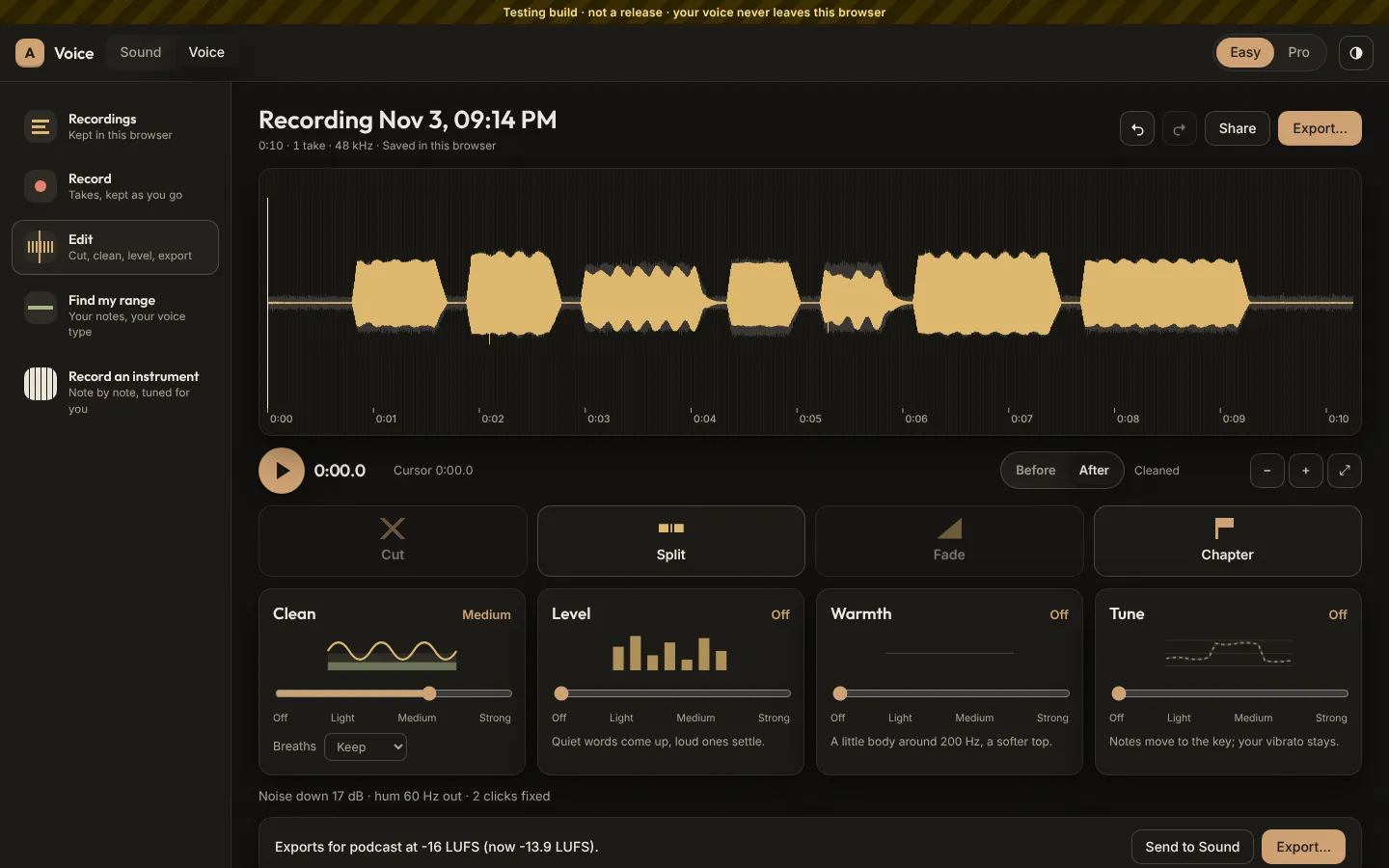
One control, Off to Strong. Clean cuts the rumble, finds the mains hum and notches it out, repairs clicks, and takes the room's noise down against a noise print it learns from your quietest moments. The noise goes down to a floor, never to dead silence, so the voice keeps its air. Breaths stay unless you choose otherwise. Every step reports what it did, and each can be undone on its own. Try it on a generated phrase with noise, hum and two clicks in it.
Grey is as recorded; colour is after Clean. Marks show the clicks it repaired. A simple version of Voice's chain, running in your browser.
Before and After are level-matched, so louder never sounds like better.
Rumble and hum
BuiltA high-pass at 80 Hz by default, and narrow notches on 50 or 60 Hz and its harmonics, found by listening to the quietest seconds.
Clicks and sibilance
BuiltShort spikes far above their surroundings are drawn through smoothly; “s” sounds are softened between 4.5 and 16 kHz only when they dominate.
Breaths
BuiltFound and kept by default. Soften or remove them on request; laughs and breaths are part of a voice.
Repair, never regenerate
BuiltClean is signal processing on your device, so a cleaned recording is still yours: its AI declaration stays None.
In tune, still human.
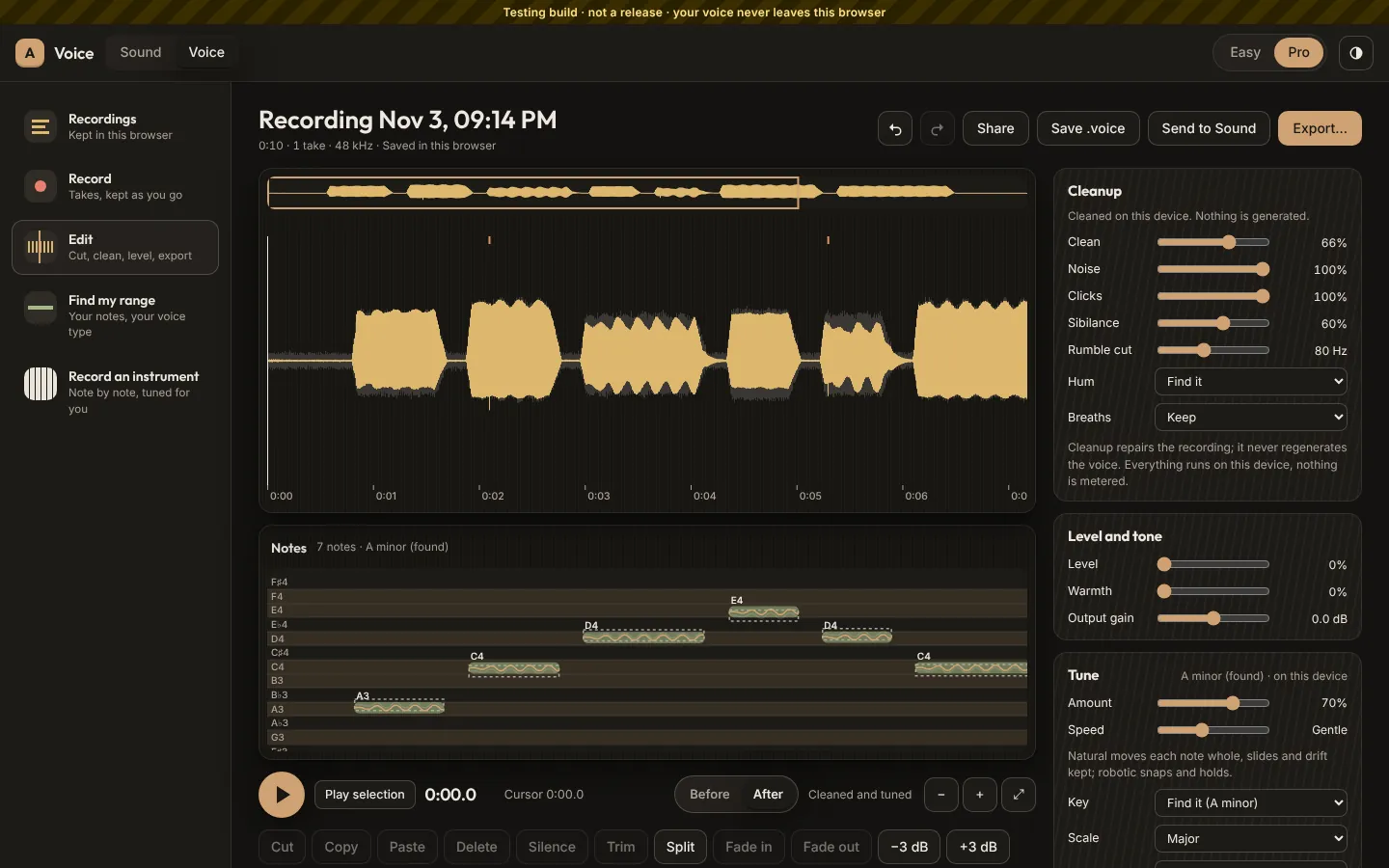
Tune finds each sung note and its key, then moves the note's centre to the scale and keeps how you sang it: the vibrato, the drift, the slides. Amount says how far it moves; Speed goes from natural to robotic. In Pro you can move a single note or straighten its drift. Tune is sound processing, so it doesn't raise the AI declaration. Drag Amount and Speed, then listen.
The lines are the pitch as sung (grey) and after Tune (colour). Notes and their cents off the scale are listed beside.
Measured 22 October 2026 on test notes sung 20 to 40 cents off, through Tune on the range finder's pitch tracker (YIN), in the audio core that the browser build and the desktop app share. Live Tune, which tunes while you record, isn't built yet.
Warmth you can see and hear.
Warmth adds a little body around 200 Hz and a softer top, and Rumble cut takes out what sits under a voice. In Pro every setting has a number. Drag the points on the curve, or use the sliders, while the phrase plays.
Drag a point. The curve is drawn from the same filters you hear.
Easy and Pro
BuiltEasy shows Clean, Level, Warmth and Tune with Before and After. Pro adds every setting with its number. Switching never changes the sound.
Level
BuiltA slow leveller brings quiet phrases up and loud ones down, holding through pauses so the room is never pumped up.
Vocal EQ
PlannedBands that follow the pitch, and matching to a reference track you own, analysed on the device.
Ready for where it's going.
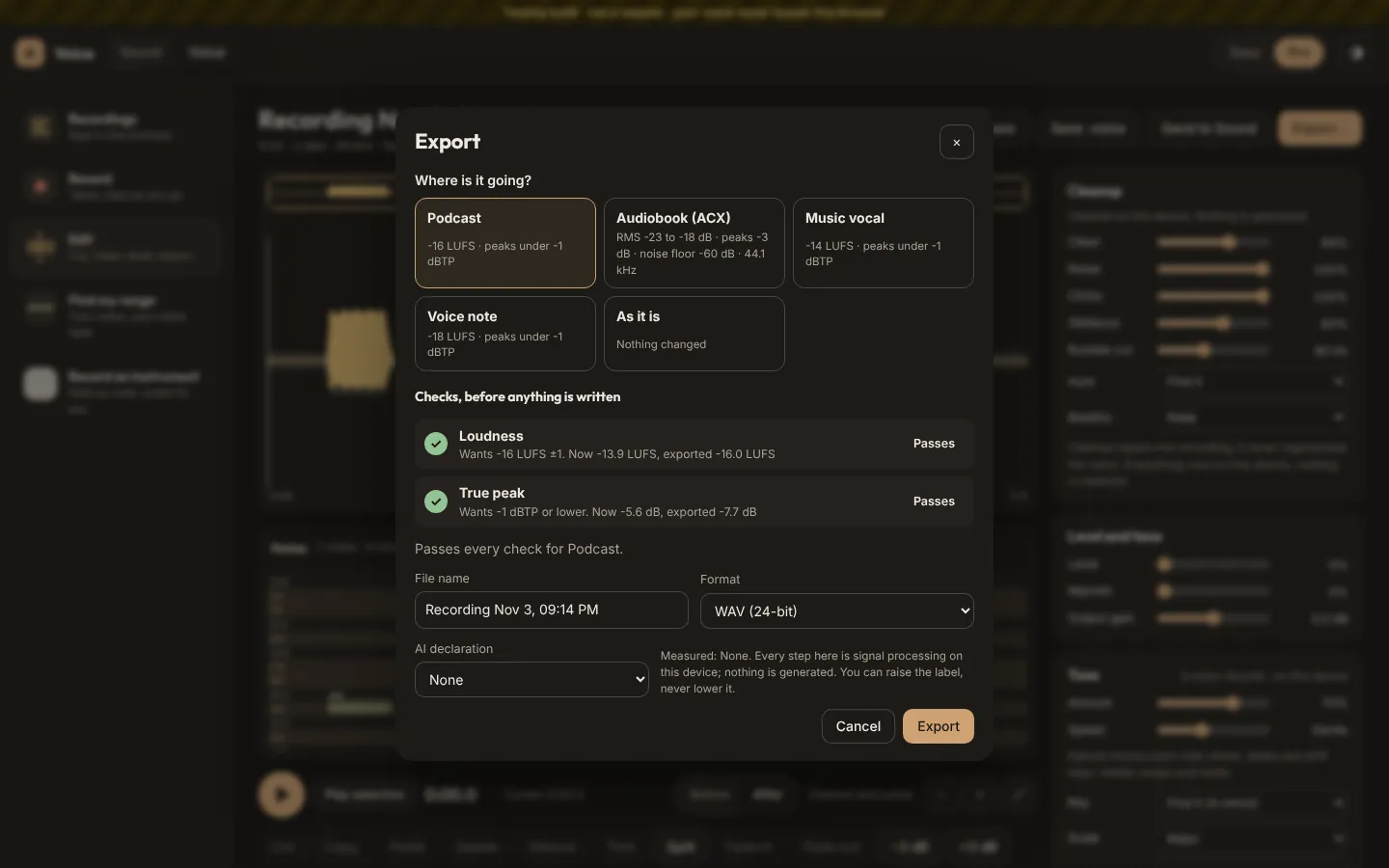
Pick where it's going: a podcast, an audiobook for Audible (ACX), a vocal for a song, or a voice note. Voice measures what the export will deliver, before anything is written, and every failing check comes with its fix. WAV, FLAC and MP3 are built; a .voice file keeps the takes and every edit in one file. Check the phrase against a preset.
Measured here with the loudness method podcasts and streaming use (ITU-R BS.1770, gated), on sample peaks. Voice measures true peaks.
Packing and waveform measured 19 October 2026 on the build machine, a release build of the audio core. The crash limit is the recorder's design, tested by killing a real recording process and checking every surviving sample. cargo test in avlory/packages/avlory_audio_core
Edit the words, the audio follows.
Voice transcribes on your device, with every word timed. Select words and the audio follows; cut them and the cut gets short fades. It finds fillers and long pauses for you to take out, each one put back on its own. Export subtitles as SRT or WebVTT, or plain text. The speech model downloads once, after you say so, and is checked before each use. Take out the fillers in an example podcast intro.
An example transcript. Click any word to cut it or put it back.
Measured 22 October 2026 in the browser test build, both models on the same clip. The model is OpenAI's Whisper (MIT licence) run in Avlory's own Rust code, downloaded from avlory.com and checked against its published SHA-256. Transcripts are analysis, so the AI declaration stays None.
Record together, apart.
Talk live from different places while each person is recorded on their own device at full quality, so the recording never depends on the network. Everyone agrees to being recorded before they join, signs in with an Avlory ID, and sees the recording light while it's on. Afterwards the takes line up exactly, even though every sound card's clock runs a little fast or slow. Set a guest's clock and line the takes up.
Simulated, with Voice's method: sync markers every tenth of a second, then a straight-line fit gives where the take starts on the host's clock and how fast its card really ran.
Measured 29 October 2026 on the build machine in 15 runs, in one process with stand-in devices and 6-second takes, the guest's clock running about 500 ppm fast. Over the internet the network adds 20 to 100 ms. Not yet measured between real computers.
Your voice stays yours.
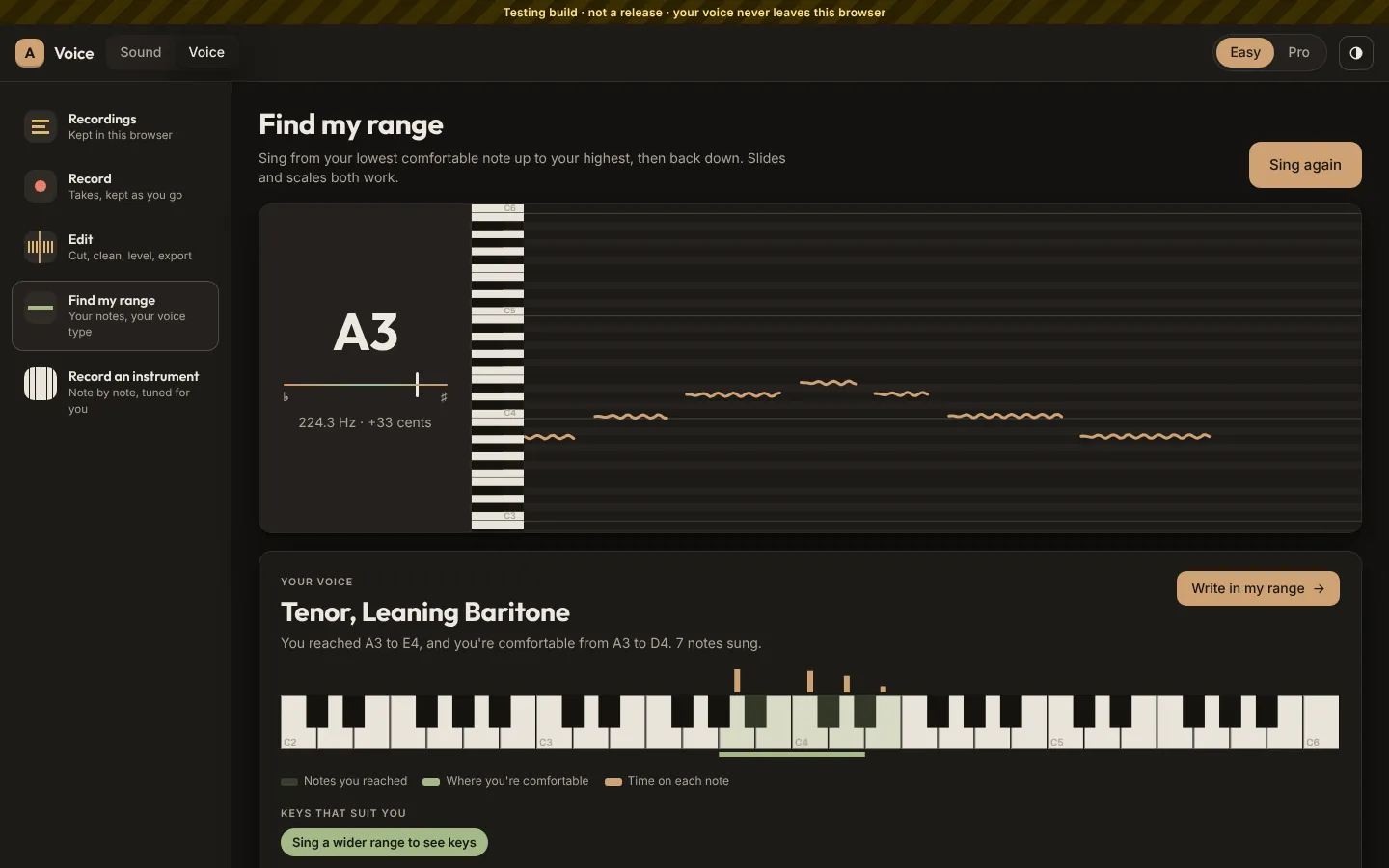
The range finder listens to you sing and tells you your lowest and highest notes, where you're comfortable, which voice type that falls into, and keys that suit you, so you can write around your voice. It's a guide, not a label. And the rules about voices are simple: yours is yours, and someone else's is used only from recordings they made. Try the range finder on three generated singers.
Voice finds the notes by listening (YIN pitch tracking, on the device). Here the notes are the ones the demo generated; the ranking is Voice's, copied from its code.
Doubles and harmonies
PlannedFrom your own voice, always fine.
Someone else's voice
DecidedOnly from recordings they made: a .voice file they sent you, or a session you recorded together.
Cloning your own voice
PlannedFix a flubbed word without re-recording. Only your own voice, trained and run on your device, and everything it makes is marked as generated.
Stock narrators
PlannedLicensed synthetic voices, not cloned from real people, on the device and always marked as generated.
Voice and the rest of Avlory.
Voice shares Sound's audio core and sends your recordings on to the rest of Avlory.
Sound
In a first buildOne shared audio core: a Voice recording drops into a Sound song as a track.
Waverate
PlannedSongs with your vocals release on Waverate through Sound, with credits and splits.
Quill
PlannedA sung melody becomes a Quill lead sheet, and the Voice player plays recordings inside Quill docs.
Create
PlannedCreate's deep dialogue cleanup opens in Voice.
Sculpt
PlannedAudio for lip-sync.
Nebula
PlannedCharacter voices, recorded by you or by actors who agreed in writing.
Sprout
PlannedRecording versions shown as changed regions on a waveform.
Podcasts and audiobooks
PlannedExport as files for now; Waverate may host them later.
Where Voice is today.
In development. The desktop app for Windows and Linux records, cleans, levels, tunes, transcribes and exports, with chapters and markers, the range finder, Send to Sound and live sessions on a testing relay; a browser build is for testers. Live Tune, the player embedded in Quill, AAC and Opus export, the phone apps and own-voice cloning come later. Downloads open through the waitlist.
Tested
- On a Linux build machine with no sound card, using stand-in devices.
- Opening a recording brings back takes a crash left and unsaved changes; the core recorder survives being killed mid-take.
- Every control labelled, the whole loop by keyboard, 200% text, light and dark.
Not tested yet
- Real microphones, interfaces and latency on the test computers.
- Killing the real app mid-take (the core recorder is tested).
- Live sessions between real computers, and macOS, iOS and Android builds.
No feature moves up a tier
A saved project always opens and exports, even after a plan ends.
Never locked out offline
A failed licence check never stops editing or export.
AI never changes work silently
Every AI change is a visible, undoable suggestion in the AI ledger.
Free to start
Plans and prices are announced at launch. All the promises
Try Voice First.
Voice's downloads open through the waitlist. We'll email you when it's ready on your platform.